
Calder Specialty Chemicals Chemical company website template
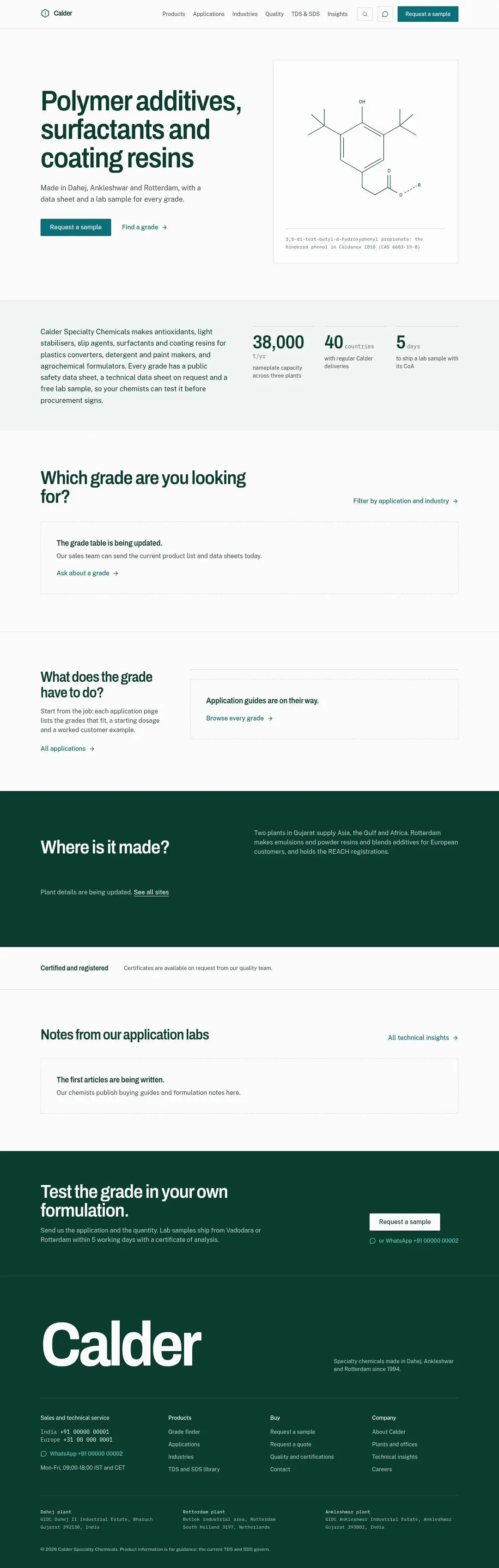
A chemical company website template with a grade finder, applications, data sheets, plant locations, lab notes and sample and quote requests.
What’s inside Calder Specialty Chemicals
On the home page, top to bottom
- Grades with a data sheet and a sample
- Which grade are you looking for
- What the grade has to do
- Where it is made
- Notes from our application labs
- Test the grade in your own formulation
Also included
- A blog, with a post list and a post page
- A contact form that files every message in your CRM
- Typefaces: Archivo and Public Sans
About the Calder Specialty Chemicals template
Calder Specialty Chemicals is built for a maker of additives, surfactants and resins. The home page lets a formulator find a grade by what it has to do, then shows where it is made and how to test it.
Products, applications and industries pages are cross-linked, and a resources page holds the TDS and SDS for every grade. Quality and certifications, plant locations, careers and lab notes from the application team are included.
Sample and quote requests are separate forms, and both send their details to your HeyLevo CRM so the right team follows up.
The colors and type in Calder Specialty Chemicals
Change them once in your theme and every page follows.
- Forest#0B3D2E
- Teal#0A6F78
- Pine#2A5A4A
- Mint wash#F1F5F3
- Off-white#FAFBFA
What’s built in
Find a grade by its job
Buyers start from what the grade has to do, not from a product code.
Data sheets on every grade
A resources page with TDS and SDS downloads.
Sample and quote requests
Two forms for two kinds of buyer, both filed in your HeyLevo CRM.
Plants and certifications
Locations and quality pages for procurement checks.
Notes from the lab
An insights section for application notes and formulation tips.
Comes with the rest of HeyLevo
Also in the same workspace: AI Chat, Event Platform and Operations. Websites start at $49 a month. Compare plans
From template to your own site in three steps
- 01
Pick a template
Open the live site and click through every page until one fits the way your business works.
- 02
Copy it into your workspace
Every page, section, font and color comes with it. You never start from a blank page.
- 03
Make it yours and publish
Swap in your words and photos, or ask Studio AI to do it, then publish on your own domain.
Questions about Calder Specialty Chemicals
Can I upload data sheets?
Yes. Add TDS and SDS files to the resources page from your HeyLevo media library.
Do sample requests and quotes go to different places?
They are separate forms, and each one is filed in your HeyLevo CRM.
Can I keep the product list in a collection?
Yes. Grades can live in a HeyLevo collection so new ones appear automatically.
Can I publish application notes?
Yes. The insights section is a blog you write from HeyLevo's editor.
More templates
Browse all templates
Get your day back.
Hand the busywork to HeyLevo. Keep the work only you can do.
A 30-minute walkthrough, built around your team's workflows.